It's clear that pretty much the entire world is now obsessed with Pinterest. And why shouldn't they be? I mean, I'm all about digital collages, and no longer having to rip pages out of a magazine/hole punch/throw in binder/lose binder, rinse and repeat. Ya know?
Wanna know what I love
even more just as much as pinning? Having
my items pinned. It's the best
ego boost feeling
seeing your own stuff, ya know, just hanging out on Pinterest. Ooooohhhh, and another awesome thing? Having them REPINNED! So yeah, you could say I'm a Pinterest fan.
So, you wanna know how to get the "Pin It" button the top of your post? Hell yeah you do! Let's go girl!
1. Go
here and see this:
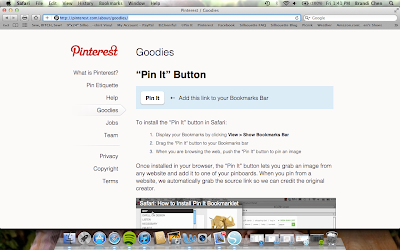 |
| Goodies indeed! |
2. Scroll down till you see this:
 |
| Pin It button for Websites--LIKE YOURS!!!! |
3. Follow the directions girl! Add your post URL, Your Photo URL (click on your photo to open for the URL), Add a description (you know, to make it easier for your fans!). Next, copy the code that you just created using all your info.
 |
| See, easy, right? |
4. Now, get it on your post! Go to "edit posts":
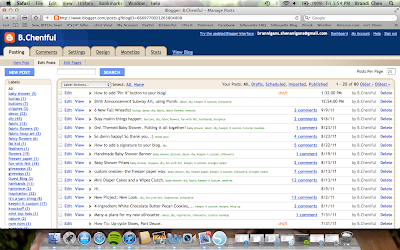 |
| See, edit posts :) |
5. Select "edit" on the post you want. Then go to "edit html" and paste the code at the top of your post:
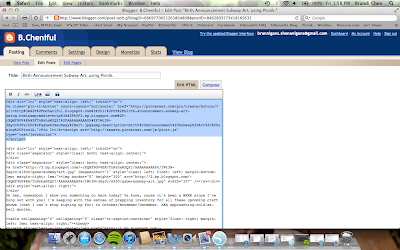 |
| Right there, the highlighted guy! |
6. Now hit "publish" and oh baby oh, there it be!
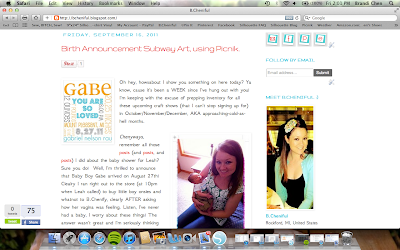 |
| Whoop, there it is!!!! |
Girl you're done! Way to rock that Pin it button! Mmmmmmhhhhmmmmm.
Now be a doll and pin this post ;-)


